
“Turn on caching” is not a plan.
It is how teams ship a homepage that stays wrong for forty minutes after a price change, a logged-in banner that appears for logged-out users, and a purge button nobody trusts so everyone redeploys the world instead.
Cache is an architecture choice: what may be stale, for how long, for whom, and how it dies when the source of truth moves. Speed is the side effect. Correctness is the product.

Faster copies are still copies. Know which reflection you are serving.
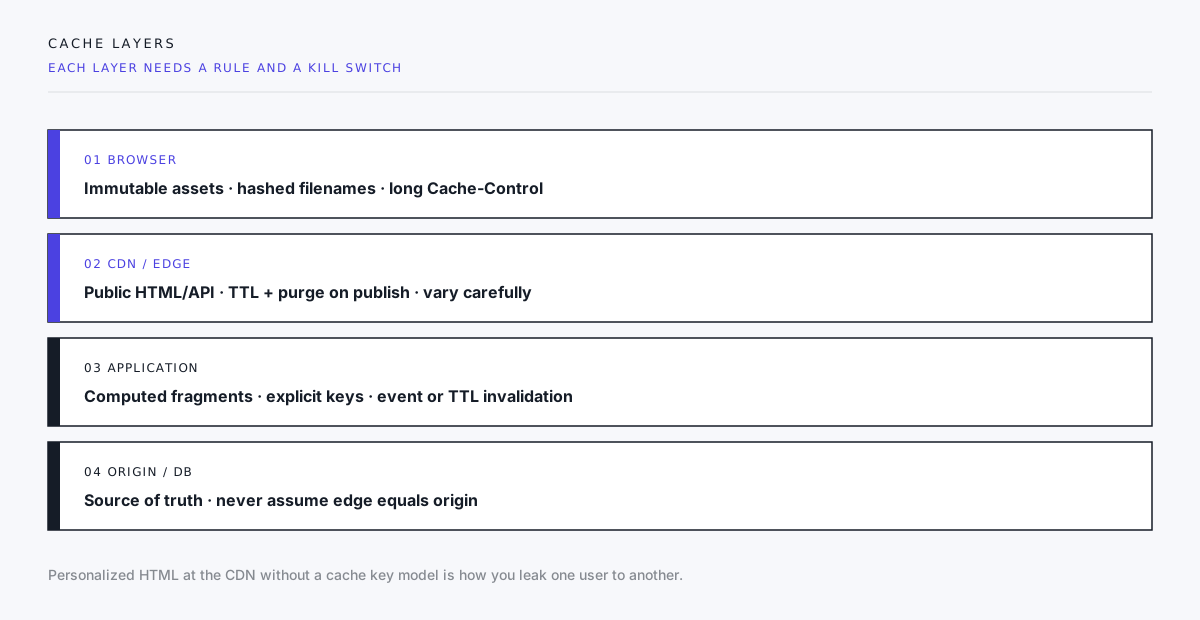
Four layers, four rulebooks
Most sites stack more than one cache. Mixing their rules is the usual failure.
1. Browser
Best for immutable static assets: hashed JS/CSS/images with long Cache-Control and immutable where appropriate. Content-addressed filenames mean “update” equals “new URL,” not “hope the browser revalidates.”
HTML for marketing pages is often short-lived or revalidated; treating index.html like a fingerprinted bundle is how users keep an old app shell.
2. CDN / edge
Good for public pages, media, and some API GETs. Needs:
- Explicit TTL (or stale-while-revalidate with eyes open)
- Purge path on publish (path, tag, or surrogate key)
- Careful
Vary(and almost never “vary on everything”) - A policy for query strings (ignore tracking params; do not cache every
?fbclid=)
CDN is not magic origin offload if every response is private, no-store because someone was scared of cookies.
3. Application cache
Redis/memcached/in-process stores for expensive computed fragments: menus, price tables, navigation trees. Keys must encode every input that changes the output. Invalidation is either TTL (simple, eventually wrong) or event-driven (harder, correct when wired).
4. Origin / database
Still the truth. If edge and origin disagree, debugging without cache headers and request IDs is folklore.
Design questions before TTL numbers
- Who is the audience of this response? Public anonymous, segment, or single user?
- What event makes it false? Publish, price update, permission change, inventory.
- How fast must truth propagate? Seconds, minutes, next deploy?
- What is worse: slow or wrong? Checkout inventory ≠ blog post body.
- How do we purge without purging the planet? Tags/keys beat “purge all” every incident.
If you cannot answer (2) and (3), do not put it on a long CDN TTL.
Personalization and the leak class of bugs
Caching personalized HTML at the edge without a correct cache key (cookie, auth, A/B bucket) is a privacy and correctness incident waiting for traffic.
Patterns that work:
- Cache the public shell; load private fragments client-side or via uncached ESI-style includes with strict rules
- Vary on a small, explicit key you control
- Prefer
privatefor truly user-specific documents
Patterns that fail:
- “We cache HTML globally; the banner is fine”
- Session cookie in
Varythat fragments the cache into useless dust - One shared “logged-in” page for everyone
Publish must include invalidation
Content systems (CMS, Edge Delivery, static deploys) need a defined moment:
- Static hosting: new deploy replaces objects; fingerprints handle assets; HTML may need CDN purge of paths
- CMS publish: webhook or build triggers purge by tag (
page:pricing,nav:global) - API-backed pages: either short TTL + SWR or event purge on write
If editors “publish” and then wait a mystery duration, you do not have a CMS. You have a rumor mill with a UI.
Headers are part of the contract
Document for each route class:
| Class | Example policy |
|---|---|
| Fingerprinted assets | long max-age, immutable |
| Public marketing HTML | short max-age or SWR + purge on publish |
| Authenticated app HTML | private, no-store or very short |
| Public JSON GET | TTL + ETag/revalidate where safe |
| Mutations | never cache |
Log Age, CF-Cache-Status / equivalent, and your app cache hit flag in staging when debugging “I don’t see my change.”
Stale-while-revalidate is a trade, not a free lunch
SWR improves perceived speed by serving stale while refreshing. That is excellent for a blog post. It is hostile for a legal page or inventory count unless product accepts the window.
Write the window down. Make legal and commerce sign it when relevant.
When not to cache
- Highly personalized checkout and account pages (unless fragment strategy is proven)
- Responses that embed CSRF or one-time tokens incorrectly
- Error pages that would sticky a 500 to the edge for a full TTL (cache 5xx carefully or not at all)
- Admin and preview routes (and keep them off the public CDN host when you can)

Every layer is another copy. Depth without a purge plan is archaeology.
A working default for brochure sites
- Fingerprint static assets; long cache.
- Generate HTML statically or at the edge with purge-on-publish.
- Keep third-party scripts from busting your mental model (they have their own caches).
- Never cache form POST/responses as if they were GETs.
- After deploy, verify one HTML path and one asset path with response headers — not only “looks updated on my machine.”
Closing
Cache is how you choose the shape of wrongness when the system is under load or between publishes: slightly stale, briefly slow, or dangerously incorrect.
Pick deliberately. Name layers, keys, TTLs, and purge events. Put purge on the same checklist as publish. Then latency gains are earned — not borrowed from correctness you will pay back during the next campaign.
If your plan still says “enable CDN” with no invalidation story, you have a latency hope, not an architecture.
Need caching and CDN rules for a marketing site or hybrid app? Start a project inquiry with which pages may be stale for five minutes and which must never be. That split is the design.