
Someone pastes a Lighthouse score into Slack. Ninety-something. Ship it.
Three months later the homepage carries two chat widgets, a personalization script, an A/B tool, an uncompressed hero, and a font stack that downloads half of Latin Extended for a three-word logo. Lab scores dip. Field data dips harder. The postmortem says “we need a performance initiative.”
You did not need an initiative. You needed a budget — ceilings with owners — before the first extra tag landed.
Core Web Vitals (LCP, INP, CLS) and the wider Web Vitals program exist to describe real user experience. They are outcomes. A performance budget is the operating system that keeps those outcomes from rotting.

Every feature has weight. Name the limit before you keep stacking.
What a budget is (and is not)
A budget is not “make it fast.” That is a mood.
A budget is a small set of measurable ceilings tied to:
- A route class (marketing homepage vs article vs app shell)
- A number (KB, ms, count of third parties)
- A gate (CI fail, PR checklist, tag review)
- An owner who can say no
Without a gate, the number is a slide. Without an owner, the gate is theater.
Start from the user path, not from a tool default
Budgets should follow how people arrive:
- Cold landing from ads/search on money pages
- Repeat article reads
- Form submit path
For public marketing sites, we usually write ceilings for:
- JavaScript weight per critical route (compressed transfer size)
- LCP element quality (image weight, priority, dimensions)
- Font cost (families × weights × subsets)
- Third-party count and weight (allowlist)
- INP risk zones (heavy main-thread work on first interaction)
- CLS hotspots (banners, embeds, late fonts)
Lab tools help set numbers. Field data (CrUX, RUM) tells you whether users still feel them. Google’s guidance on Web Vitals is explicit that real-user experience is the point — not a single lab run on a developer laptop.
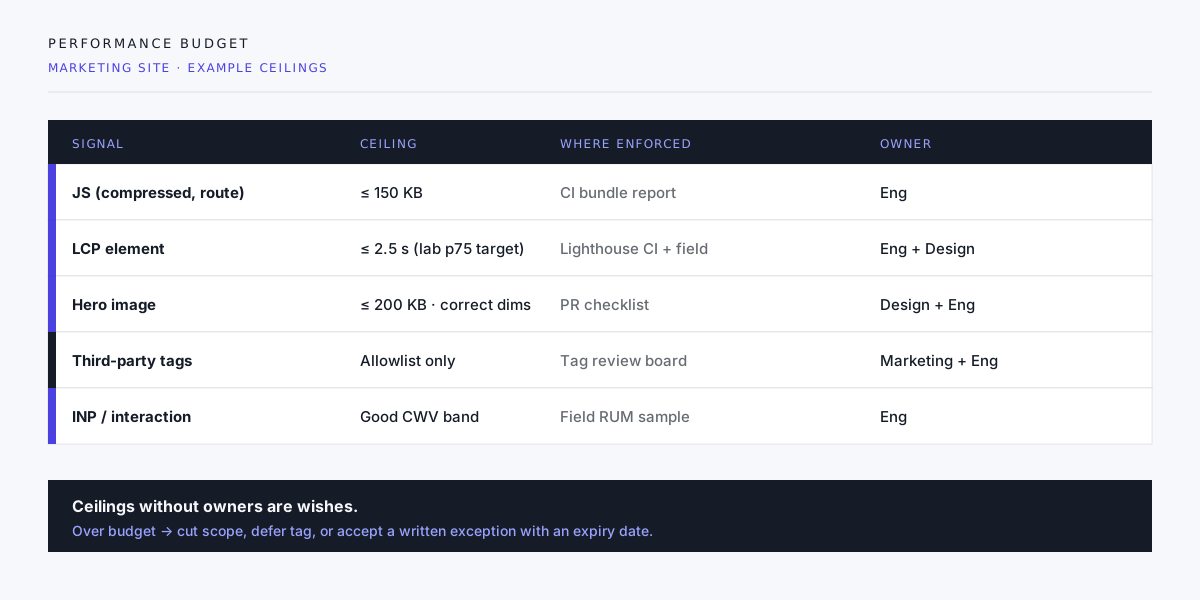
Example ceilings (marketing site)
Numbers are examples, not universal law. Adjust to product reality, then freeze them until you consciously change the contract.
| Signal | Example ceiling | Gate |
|---|---|---|
| JS per route | 150 KB gzip/brotli | CI bundle report |
| Hero image | 200 KB, correct width/height | Design + eng PR check |
| Web fonts | 2 weights, subset | Token PR |
| Third parties | Allowlist only | Marketing + eng review |
| LCP (lab target) | Within “good” CWV band on reference hardware | Lighthouse CI |
| New tag | Must state purpose + kill date | Tag board |
App shells need different numbers. Do not copy a blog budget onto a dashboard.
Enforce or accept rot
Budgets die in three places:
1. “Just this one tag”
Personalization, chat, heatmaps, pixels — each is reasonable alone. Together they own your main thread. Require a written purpose, an owner, and a removal date. Expired experiments that still load are pure theft from LCP and INP.
2. Design without bytes
A 4K hero exported as PNG will beat any CSS trick. Budget media at handoff: format (AVIF/WebP with fallback), max dimensions, lazy below-fold, priority only for the true LCP element.
3. Framework default weight
SPA shells, icon packs, and “one utility for everything” libraries spend the JS budget before product code starts. Choose the architecture that matches the page class — documents vs application — then spend bytes on purpose.
Lab, field, and honesty
- Lab (Lighthouse, WebPageTest): reproducible, good for PR gates and regressions.
- Field (CrUX, RUM): what customers felt, including their devices and networks.
A green lab score with red field LCP means your test is not the user. A red lab score on a throttled mobile profile is often the more honest story for a global marketing site.
Track both. Budget both when you can. Never declare victory from one homepage run on fiber.
How we install a budget in a project
- Pick route classes (home, service, article, form thank-you).
- Baseline current weight and CWV (lab + field if available).
- Write ceilings slightly tighter than “barely good” so you have room to live.
- Wire CI for JS/CSS weight and a Lighthouse budget on key URLs.
- Add human gates for tags, fonts, and heroes (tools miss intent).
- Review monthly — not only when someone complains.
When a request exceeds the budget, options are only:
- Cut something else
- Defer the feature
- Raise the budget with a dated exception and a named approver
“We’ll optimize later” is not an option. It is how the last site died.

Speed is measured. Unmeasured speed is storytelling.
Anti-patterns
- Optimizing micro-CSS while shipping a 1 MB hero
- Celebrating Lighthouse 100 after blocking all third parties only in the test profile
- Infinite image carousels above the fold
- Hydrating the entire page for a single menu
- Performance “sprints” with no ongoing gate (the weight returns in two releases)
Closing
Performance is not a vibe and not a one-time audit. It is resource governance.
Write the ceilings. Name the owners. Fail the build when it matters. Make marketing and design co-sign the third-party allowlist. Then Core Web Vitals stop being a quarterly panic and start being a property of how you ship.
If your plan still says “we’ll check Lighthouse before launch,” upgrade it to “we have a budget that can say no.” That single sentence saves more user time than another hero animation ever will.
Need a performance budget wired into CI and tag review? Start a project inquiry with your top three URLs and any tags you already know you will not remove. That is enough to draft ceilings.