
Teams polish the button.
Gradient, microcopy, “Get a free consult,” confetti on success. The form looks finished. Then a prospect hits a silent network error on mobile data, loses the brief they typed, and emails a competitor instead.
A lead form is not decoration under a hero. It is a narrow revenue path with failure modes: validation, transport, spam, consent, and operational follow-up. Treat it like reliability engineering with a marketing costume.

If the envelope never arrives, the page did not convert — it performed.
Start from failure, not from Figma
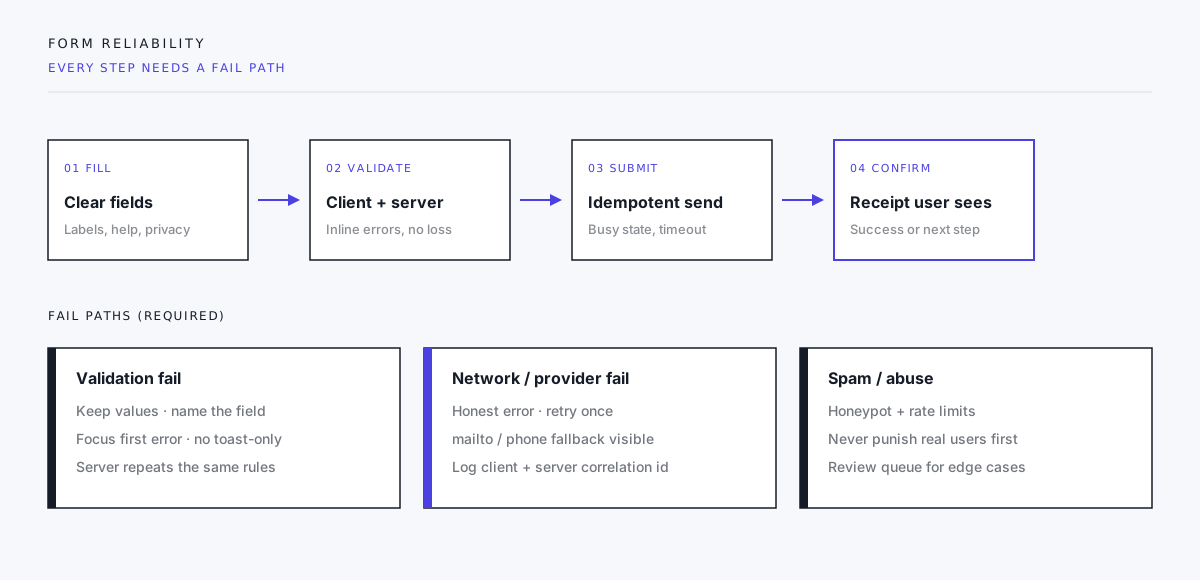
Before layout, write the states you will support:
| State | User must understand | System must do |
|---|---|---|
| Empty | What to provide and why | Show labels, privacy, expected response time |
| Invalid | Which field and how to fix | Keep values; focus first error |
| Submitting | Wait; do not double-send | Disable submit; idempotent request |
| Success | What happens next | Clear receipt; optional reference id |
| Transport fail | Not their fault; how to reach you | Retry + visible email/phone fallback |
| Spam blocked | Minimal leakage to bots | Soft fail or challenge without nuking UX |
If any row is “we’ll toast something,” the form is incomplete.
Progressive enhancement is not nostalgia
The baseline that still wins:
- Semantic
<form>with reallabelelements and a workingactionif you ever need a non-JS path. - Server-side validation that mirrors client rules (client-only checks are a suggestion, not security).
- Clear
autocompleteattributes so browsers and password managers help instead of fight you. - HTTPS, privacy copy next to consent, and no surprise secondary marketing opt-ins buried in legalese.
JavaScript should improve the path: inline validation, async submit without full reload, better status text. It should not be the only way a message can leave the browser. When the script bundle fails to load — ad blockers, flaky CDN, old WebView — a dead form is a quiet revenue leak.
Validation that respects the person typing
Good validation is specific and local:
- “Enter a work email” beats “Invalid input.”
- Errors sit with the field, not only in a banner at the top.
- Submitting does not wipe a 200-word project brief because phone formatting was wrong.
- Optional fields stay optional; required fields are honest in the UI and the schema.
Match the business rules you actually use. If sales will accept personal Gmail for inbound, do not block it for aesthetic “work email only” theater. If you need a budget range, say why.
Submit is a distributed system
On send, several things can break: DNS, CORS, third-party form backend, quota, timeout, browser backgrounding the tab.
Design for that:
- Busy state on the button; prevent double posts.
- Timeout with a clear retry.
- Correlation id in client message and server log so support can find the attempt.
- Success only when the backend acknowledges storage or queue acceptance — not when
fetchresolved with an opaque no-cors void. - Fallback contact always visible near the form: email and phone that do not depend on the widget.
“Thanks!” screens that appear before the message is durable are how teams invent phantom leads.
Spam without a war on humans
Bots will find public forms. Defenses that usually pay rent:
- Honeypot fields hidden from real users
- Rate limiting by IP and by session
- Time-to-complete checks (instant submits are suspicious)
- Server-side content heuristics for obvious spam
Defenses that often tax real people first:
- Aggressive CAPTCHAs on first touch for every locale
- Blocking entire regions that buy from you
- Mystery 403 pages with no alternate contact
Log spam decisions. Review false positives. The goal is a clean inbox, not a form that only engineers can complete.
Consent and data minimization
If you collect personal data, say what you do with it next to the control that submits. Tie consent to a stored value you can prove later. Collect only fields you will use in the first sales conversation — every extra field is abandonment and liability.
File uploads need size limits, type allowlists, malware scanning where relevant, and a clear note on what not to send. “Attach anything” is how sensitive documents land in the wrong bucket.
After the click is still product
The form ends when a human acts, not when the HTTP response returns.
Define:
- Who is notified (and the backup if they are out)
- SLA for first response (and show a honest version on the page)
- CRM / ticket fields mapping from the form schema
- What “spam” and “duplicate” mean operationally
A beautiful form that pages nobody is a design exercise.

Most forms design the closed envelope. Reliability is knowing which ones open on the other side.
A ship checklist we use
- Labels and errors work with keyboard and screen reader.
- Client and server validation agree.
- Submit is idempotent; double-click does not create three leads.
- Success and failure copy are written, not placeholder.
- Email/phone fallback is visible without scrolling the legal footer.
- Spam controls do not block the primary persona on a clean device.
- Privacy / consent language matches storage and CRM use.
- Someone owns the inbox or queue with a backup.
- Staging test with throttled network and JS disabled (where a baseline path exists).
- Analytics tracks attempt, validation fail, success, and transport fail separately — not one vanity “form interaction.”
Closing
Confetti is optional. Receipts are not.
Build the error paths, the durable submit, the human fallback, and the operational owner. Then make the button look like your brand.
If your form project starts with animation and ends with “we’ll wire the backend later,” you have inverted the risk. Wire the path that carries money and trust first. Style it second.
Need an inquiry form that survives real networks and real spam? Start a project inquiry — and if this form ever fails, the email next to it still works on purpose.