
A familiar brief arrives: homepage, services, pricing, blog, contact form. The stack conversation starts with a framework that assumes a client router.
That choice is rarely argued on the merits of the site. It is argued on habit. “We already use React.” “It should feel like an app.” “SPAs are modern.”
Most marketing surfaces are not apps. They are a set of documents people open from search, ads, email, and social, read, and leave. Treating them as a single long-lived application shell costs more than it returns — and the cost shows up in measurement, maintenance, and the wrong kind of complexity.

Public pages need a threshold, not a permanent session.
What “app feel” is usually buying
When someone asks for app-like navigation on a brochure site, they usually mean three things:
- Continuity — the header does not flash white between pages.
- Speed — the next page appears without a long blank pause.
- Polish — motion that signals quality.
None of those require a full client-side router and a hydration strategy for every route.
Browser-native view transitions can animate between full documents in a multi-page app. In Astro’s model, that path does not turn the site into a SPA, does not invent a second navigation lifecycle for every script, and does not add a default client router tax. Astro’s docs are explicit: native cross-document transitions “don’t alter the core functionality of a multi-page application… They simply add animations.”
If you need features that the native API still lacks, frameworks offer SPA-mode routers (Astro’s <ClientRouter /> is one). That is a deliberate upgrade path — not the default for a contact page and three service URLs.
Core Web Vitals still prefer honest page loads
Google’s Core Web Vitals measure real user experience: loading (LCP), responsiveness (INP), and visual stability (CLS). Field data for those metrics is still rooted in full navigations far more cleanly than in soft, in-app route changes.
Chrome’s own guidance on SPA architectures is careful but clear: a well-built SPA can score well, yet optimized multi-page sites have structural advantages. With an MPA, each URL is a real navigation. Users who read more than one page contribute multiple page loads to field data. Soft navigations inside a SPA historically did not produce the same LCP story in CrUX the way full loads do — and soft-navigation measurement has been an ongoing experiment, not a settled replacement for document navigations.
That matters for marketing sites because:
- Landing traffic is cold. Ads and organic search land on many URLs, not only
/. - Share links are product. Every service and article URL must stand alone.
- You care about field data, not only a lab Lighthouse score on the homepage after a warm cache.
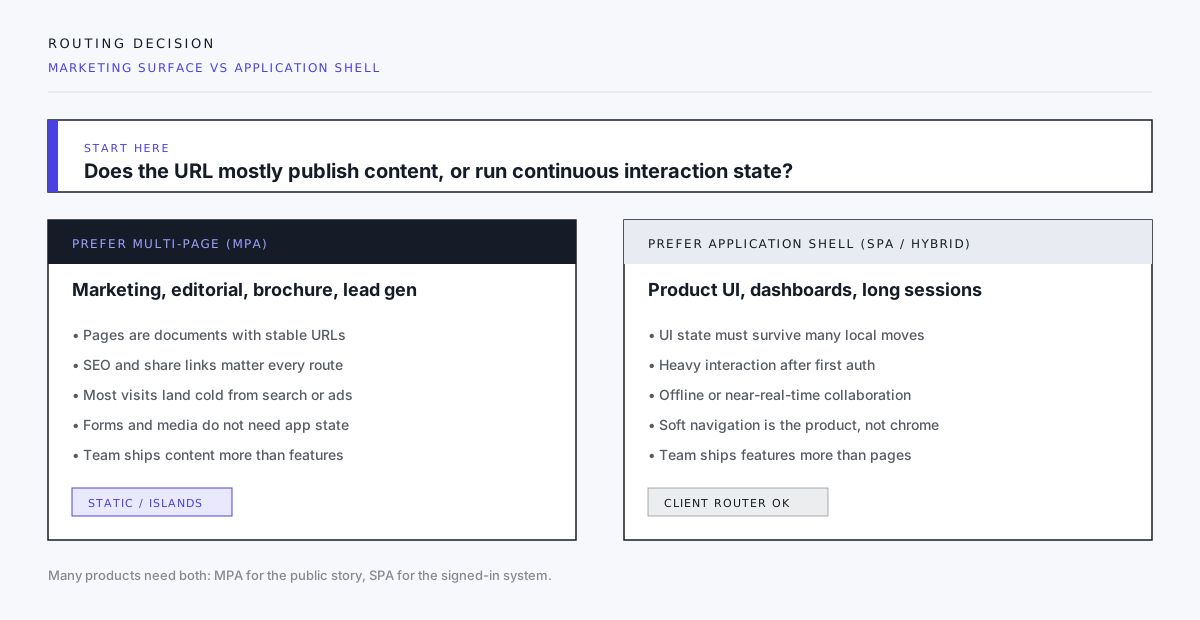
If the public site is mostly HTML, CSS, a few islands of interactivity, and forms, an MPA with static HTML (or server-rendered HTML) is the architecture that matches how people actually arrive.

Each URL is a complete document. The links are intentional, not a single endless scroll of state.
The SPA tax on a brochure
Client routing on a content site is not free. You pay in:
Hydration and JS ownership
Every interactive island that mounts on first paint must be justified. A SPA default often hydrates navigation, layout chrome, and content wrappers whether the page needs them or not. Marketing pages usually need a menu, a form, and maybe a filter — not a global application runtime.
Script re-initialization
Once you adopt SPA-mode transitions, lifecycle changes. Astro’s own docs warn that scripts that worked on full reloads may not re-run after a client navigation unless you hook astro:page-load (or equivalent). Menus, analytics, cookie banners, and form enhancers all become “remember to rebind” work.
That is fine inside a product app. It is busywork on a five-page studio site.
Analytics and consent edge cases
Hard navigations make “page view” obvious. Soft navigations require explicit instrumentation. Cookie banners, A/B tools, and tag managers all grow special cases. Teams ship ghost pageviews or missing ones for months without noticing.
Mental model mismatch
Editors and marketers think in pages. Developers forced into a single app tree start inventing route config for what used to be a file. The content model gets harder, not clearer.
When a client router is the right tool
Do not take this as anti-SPA ideology. Use an application shell when the product is continuous interaction:
- Authenticated dashboards and multi-step builders
- Real-time collaboration or offline-first tools
- Dense UI state that must survive dozens of local transitions without full reloads
- Experiences where the “page” is a viewport over live data, not a document
In those cases, soft navigation is the product. Measure it deliberately. Budget the JS. Own the lifecycle.
Many companies need both: a multi-page public site and a separate app origin or path for the signed-in product. That split is healthy. Collapsing the brochure into the app router because one team prefers one repo is how public performance and content velocity die quietly.
A practical default for public sites
For marketing and editorial surfaces, our default discovery answer looks like this:
- HTML documents per URL — static generation or server rendering, not a blank shell waiting on JS.
- Islands, not oceans — hydrate only the controls that need it (nav toggle, forms, filters).
- Motion without a router first — CSS, progressive enhancement, and where support allows, native view transitions between documents.
- SPA-mode router only with a written reason — shared media that must persist, stateful UI that spans routes, or a measured UX requirement native transitions cannot meet.
- Respect reduced motion — Astro’s client router disables transition animations when
prefers-reduced-motionis set; any custom motion should do the same. - Keep forms boring — full navigations or explicit progressive enhancement beat clever client-only submit paths for lead capture reliability.
Questions that end the wrong debate
Ask these before anyone opens a boilerplate:
| Question | If yes… |
|---|---|
| Will most sessions open one or two URLs from external referrers? | Optimize cold loads per URL (MPA). |
| Do editors think in pages and publish without deploys of app code? | Prefer content-first documents. |
| Is “app-like” mainly about motion and header continuity? | Try native transitions / CSS before a client router. |
| Does the UI require long-lived client state across many routes? | Build an app shell — separately if needed. |
| Are Core Web Vitals part of SEO or brand proof? | Do not hide weak field data behind soft navigations you do not measure. |
What good looks like
A healthy public site feels quick on a cold phone, announces real page titles to assistive tech on every navigation, and does not require a JavaScript archaeology dig to change a hero line.
A healthy product app feels continuous after login, owns its soft navigations, and does not pretend its dashboard LCP story is the same problem as the homepage.
Confusing the two is how teams spend six months polishing a router while the pricing page still ships 400 KB of unused client code.
Closing
Smooth does not mean single-page. Modern does not mean “hydrate everything.”
For the public story — services, proof, blog, contact — ship documents. Add motion with restraint. Reach for a client router when the experience is genuinely an application, not when the slide deck said “app-like.”
If you are redrawing a marketing site and the first commit is a global router, pause. Write down whether you are building pages people read or a system people operate. The architecture should follow that sentence — not the other way around.
Planning a public site or a split between marketing and product? Start a project inquiry with the URL map you already have. That is enough to choose MPA, islands, or an app shell on purpose.